Get the link to change the password

E-mail *

Send
Give up
logo
022 822 024

Assistment and Call Center

New account

New account

First name *
The field will be filled with letters (A to Z), who will be reflected at articles and comments
Last name *
The field will be filled with letters (A to Z), who will be reflected at articles and comments
Login *
The field will be filled with letters (A to Z) and/or numbers, without free spaces. Can be used the symbols, except the symbol _
E-mail *
The field will be completed with un valid e-mail. To this e-mail will be sent the confirmation link about the registred user account
Password *
The password will be contain at 5 to 15 characters and will be different for the date indicated at the login, name and firstname

Repeat password *

Cancel
Sign in

Sign in

Sign in can be to do with e-mail adresss or login

E-mail/Login *

Password *

Sig in with your Google account
MPass authentication
Cancel

Get the link to change the password

E-mail *

Send
Give up
EN
  • RO
  • RU
RORUEN
logo
About usDaily6The expert position 1Related section1Accounting sectorServices11Contribuabil onest 2026Contacts

PP „Monitorul Fiscal FISC.MD”

MD-2005, Kishinev
Constantin Tanase street, no. 6
Inside „Fertilitatea-Chișinău” Corporation., 3-th floor, office 320

Antechamber:

022 822 024

E-mail:

secretariat@monitor.tax

Support and Contact Center:

022 822 024

You want to obtain an operative and complex answer?

Send your question and obtain the answer from the experts in the shortest time, at your e-mail or published in the compartment „Questions and answers”

Ask us a questionAcces disponibil doar pentru abonații Premium și Electronic. Asigură-te că ești autentificat în contul de utilizator și deții un abonament activ.
ArhivaFrequent questionsTerms and conditions of use of the page Privacy policyInstrucțiuni pentru ștergerea contului

Subscription at Newsline

facebooktwitterlinkedintelegraminstagramgoogle
MAIB logoMasterCard logoVisa logo

Site version: 1.0

Copyright 2021

All riths on the page monitorul.fisc.md belongs P.P. „Monitorul Fiscal FISC.MD”. Full or partial reproduction about informations or illustrations in either compartment is possible only with the written consent of the publication. Intellectual piracy is punishable by law.

icon

Feedback

To monitor the status of sent Feedback, initial we recommend to you to do sign in on the page. So, the answer at PP „Monitorul Fiscal FISC.md” at feedback will be save and will be displayed in your personal profile. If the feedback is sent an you aren't authentificated on the page, the message will be sent tot your e-mail.

E-mail: *

Message *
Message
0/500
Cancel the message
iconiconicon
icon
Facebook iconTwitter iconLinkedIn iconTelegram iconVK icon
icon
  • Home page
  • Daily
  • News
  • Start la desemnarea 2%
Banner A1
Banner A2
Banner C3
Banner C4
Banner C5
Banner A1
Banner A2
Article image

News

Start la desemnarea 2%

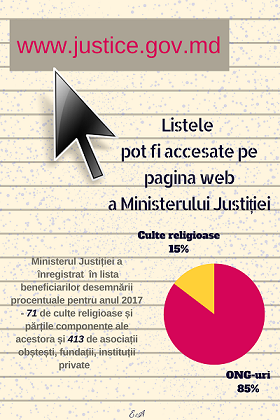
Pe parcursul perioadei ianuarie-aprilie 2017 persoanele fizice pot desemna 2% din suma impozitului său pe venitul calculat și achitat la buget pentru anul 2016 în favoarea unui beneficiar eligibil (ONG sau cultele religioase și părțile componente ale acestora). Ministerul Justiției deja a întocmit și plasat pe pagina sa web Lista beneficiarilor desemnării procentuale, poate fi accesată la următorul link: www.justice.gov.md Menționăm că, organizațiile care au dorit să beneficieze de prevederile Legii 2%, urmau să se înregistreze la Ministerul Justiției în perioada 2 - 29 decembrie 2016. Cei ce nu au reușit, vor putea să o facă în perioada 01-30 septembrie 2017, pentru a putea beneficia de Legea 2% în anul 2018. La moment, 413 ONG-uri1 (asociaţii obşteşti, fundaţii, instituţii private) și 71 culte religioase şi părțile lor componente2 sunt în drept să beneficieze de 2% din suma impozitului pe venit al persoanelor fizice, în cazul în care vor fi selectați de către contribuabili. 1 www.justice.gov.md 2 www.justice.gov.md Pentru a desemna 2% din suma impozitului său pe venitul calculat și achitat la buget pentru anul 2016, persoana fizică urmează să parcurgă următorii pași:

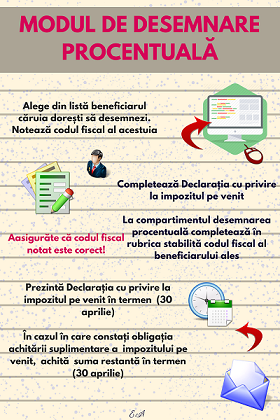
  1. Să aleagă un singur benibiciar din Lista beneficiarilor desemnării procentuale care este publică pe pagina web a Ministerului Justiției.
  2. Să noteze Numărul de identificare de stat (IDNO) al beneficiarului ales.
  3. Să completeze Declaraţia persoanei fizice cu privire la impozitul pe venit (Formular CET 15).
  4. În secţiunea ,,Desemnarea procentuală” să introducă Codul fiscal (IDNO) al beneficiarului ales (vezi pasul 2).
  5. Să prezinte organului fiscal (fie pe suport de hîrtie fie în format electronic) Declaraţia (Formular CET 15) nu mai tîrziu de 30 aprilie 2017.
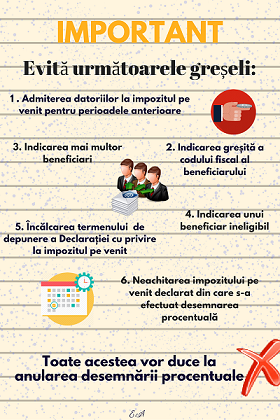
  6. Menționăm că prin amendamentele efectuate la Codul fiscal prin Legea nr.281 din 16.12.2016 a fost extins termenul de prezentare a Declarației cu privire la impozitul pe venit pentru persoanele fizice de la 25 martie la 30 aprilie.
  7. Să achite obligațiile privind impozitul pe venit în termen (30 aprilie), în cazul în care există obligația spre plată.
Nerespectarea cerințelor din pașii descriși mai sus vor duce la anularea desemnării efectuate.
Institutions:

Publicaţia periodică "Monitorul Fiscal FISC.MD" | Ministerul Finanțelor al Republicii Moldova

„Acest articol aparține exclusiv P.P. „Monitorul fiscal FISC.md” și este protejat de Legea privind drepturile de autor.
Orice preluare a conținutului se face doar cu indicarea SURSEI și cu LINK ACTIV către pagina articolului”.

advertising: 320x50 px

7664 views

The date of publishing:

03 January /2017 13:00

Tags:

desemnare | persoanele fizice | venitul calculat | ministerul justitiei | organizațiile | Legea 2%

0 comments

Only users registered

New account

First name *
The field will be filled with letters (A to Z), who will be reflected at articles and comments
Last name *
The field will be filled with letters (A to Z), who will be reflected at articles and comments
Login *
The field will be filled with letters (A to Z) and/or numbers, without free spaces. Can be used the symbols, except the symbol _
E-mail *
The field will be completed with un valid e-mail. To this e-mail will be sent the confirmation link about the registred user account
Password *
The password will be contain at 5 to 15 characters and will be different for the date indicated at the login, name and firstname

Repeat password *

Cancel
and autorized

Sign in

Sign in can be to do with e-mail adresss or login

E-mail/Login *

Password *

Sig in with your Google account
MPass authentication
Cancel

Get the link to change the password

E-mail *

Send
Give up
they have the right to post comments.