





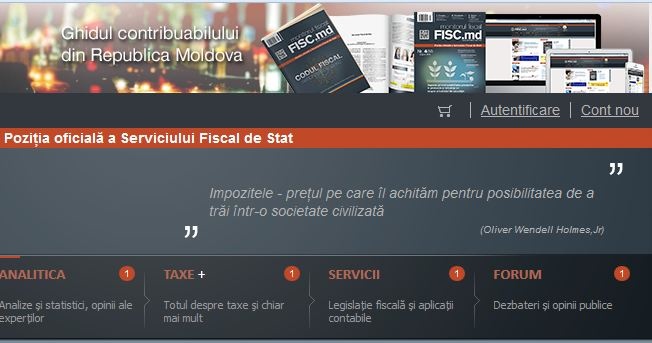
 Pentru a vă autentifica, aveți nevoie de un loghin și o parolă. Drept loghin utilizați email-ul indicat la abonare, iar pentru a intra în cont, generați o parolă automată, care să Vă permită utilizarea contului.
Cum generăm parola
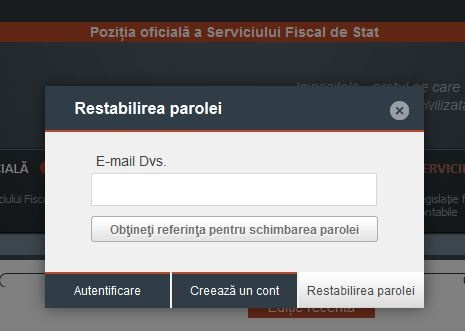
1) Din fereastra care se afișează la accesarea „Autentificare”, alegeți „Restabilirea parolei".
Pentru a vă autentifica, aveți nevoie de un loghin și o parolă. Drept loghin utilizați email-ul indicat la abonare, iar pentru a intra în cont, generați o parolă automată, care să Vă permită utilizarea contului.
Cum generăm parola
1) Din fereastra care se afișează la accesarea „Autentificare”, alegeți „Restabilirea parolei".
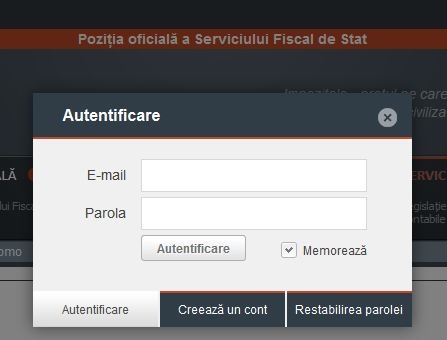 2) În fereastra de restabilire a parolei indicați emailul indicat la abonare și apăsați butonul de mai jos.
 3) Verificați email-ul. Sistemul V-a transmis o scrisoare ce conține un link, care trebuie accesat.
În câteva clipe pe email va veni o nouă scrisoare cu parola automată formată din cifre și litere.
Pasul 3. Reveniți la portal și autentificați-Vă folosind emailul și parola generată de sistem.
Pasul 4. Portalul Vă identifică și Vă salută cu „Bine ați venit” și numele Dvs. sau denumirea întreprinderii.
Acum, Dumneavoastră aţi obţinut posibilitatea să consultați orice material plasat pe www.monitorul.fisc.md.
La necesitate, puteți modifica parola pentru accesarea portalului, prin intermediul opțiunii Setări/Contul personal:
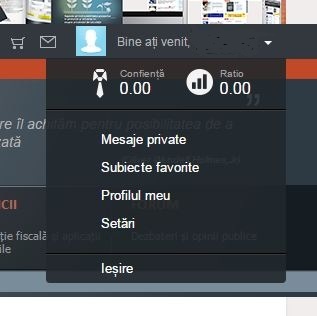
- Apăsați „săgeata în jos” de lângă numele Dvs./denumirea întreprinderii
- Din lista deschisă alegeți „Setări”.
3) Verificați email-ul. Sistemul V-a transmis o scrisoare ce conține un link, care trebuie accesat.
În câteva clipe pe email va veni o nouă scrisoare cu parola automată formată din cifre și litere.
Pasul 3. Reveniți la portal și autentificați-Vă folosind emailul și parola generată de sistem.
Pasul 4. Portalul Vă identifică și Vă salută cu „Bine ați venit” și numele Dvs. sau denumirea întreprinderii.
Acum, Dumneavoastră aţi obţinut posibilitatea să consultați orice material plasat pe www.monitorul.fisc.md.
La necesitate, puteți modifica parola pentru accesarea portalului, prin intermediul opțiunii Setări/Contul personal:
- Apăsați „săgeata în jos” de lângă numele Dvs./denumirea întreprinderii
- Din lista deschisă alegeți „Setări”.
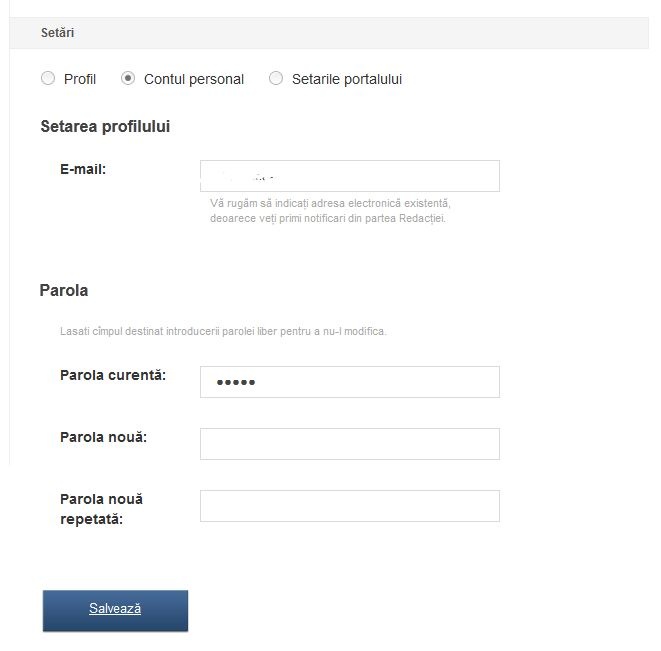
 • Din pagina afișată, alegeți „Contul personal”.
• Indicați emailul înscris la procurarea abonamentului.
- Această adresă va fi utilizată, în continuare, pentru logare și primire de mesaje din partea Redacției.
• Indicați parola curentă – cea generată de sistem la restabilirea parolei.
• Indicați parola nouă și repetați-o în boxa de mai jos.
• Salvați modificările.
• Din pagina afișată, alegeți „Contul personal”.
• Indicați emailul înscris la procurarea abonamentului.
- Această adresă va fi utilizată, în continuare, pentru logare și primire de mesaje din partea Redacției.
• Indicați parola curentă – cea generată de sistem la restabilirea parolei.
• Indicați parola nouă și repetați-o în boxa de mai jos.
• Salvați modificările.
Institutions:
„Acest articol aparține exclusiv P.P. „Monitorul fiscal FISC.md” și este protejat de Legea privind drepturile de autor.
Orice preluare a conținutului se face doar cu indicarea SURSEI și cu LINK ACTIV către pagina articolului”.
2036 views
The date of publishing:
21 February /2018 16:00
Catalogul tematic
Noutăți
Tags:
acces | abonament electronic | Abonamentul PREMIUM | parola | monitorul.fisc.md
0 comments
New account
Repeat password *
Sign in
Sign in can be to do with e-mail adresss or login
E-mail/Login *
Password *