Get the link to change the password

E-mail *

Send
Give up
logo
022 822 024

Assistment and Call Center

New account

New account

First name *
The field will be filled with letters (A to Z), who will be reflected at articles and comments
Last name *
The field will be filled with letters (A to Z), who will be reflected at articles and comments
Login *
The field will be filled with letters (A to Z) and/or numbers, without free spaces. Can be used the symbols, except the symbol _
E-mail *
The field will be completed with un valid e-mail. To this e-mail will be sent the confirmation link about the registred user account
Password *
The password will be contain at 5 to 15 characters and will be different for the date indicated at the login, name and firstname

Repeat password *

Cancel
Sign in

Sign in

Sign in can be to do with e-mail adresss or login

E-mail/Login *

Password *

Sig in with your Google account
MPass authentication
Cancel

Get the link to change the password

E-mail *

Send
Give up
EN
  • RO
  • RU
  • EN
RORUEN
logo
About usDaily3The expert position 4Related sectionAccounting sector1Services15Contacts

PP „Monitorul Fiscal FISC.MD”

MD-2005, Kishinev
Constantin Tanase street, no. 6
Inside „Fertilitatea-Chișinău” Corporation., 3-th floor, office 320

Antechamber:

022 822 024

E-mail:

secretariat@monitor.tax

Support and Contact Center:

022 822 024

You want to obtain an operative and complex answer?

Send your question and obtain the answer from the experts in the shortest time, at your e-mail or published in the compartment „Questions and answers”

Ask us a questionAcces disponibil doar pentru abonații Premium și Electronic. Asigură-te că ești autentificat în contul de utilizator și deții un abonament activ.
ArhivaFrequent questionsTerms and conditions of use of the page Privacy policyInstrucțiuni pentru ștergerea contului

Subscription at Newsline

facebooktwitterlinkedintelegraminstagramgoogle
MAIB logoMasterCard logoVisa logo

Site version: 1.0

Copyright 2021

All riths on the page monitorul.fisc.md belongs P.P. „Monitorul Fiscal FISC.MD”. Full or partial reproduction about informations or illustrations in either compartment is possible only with the written consent of the publication. Intellectual piracy is punishable by law.

icon
Acces disponibil doar pentru abonații Premium și Electronic. Asigură-te că ești autentificat în contul de utilizator și deții un abonament activ.
iconiconicon
icon
Facebook iconTwitter iconLinkedIn iconTelegram iconVK icon
icon
  • Home page
  • Daily
  • News
  • Semnătura electronică de la CTIF va fi valabilă doi ani
Banner A1
Banner A2
Banner C3
Banner C4

publicitate: 420x90 px

Banner A1
Banner A2
Article image

News

Semnătura electronică de la CTIF va fi valabilă doi ani

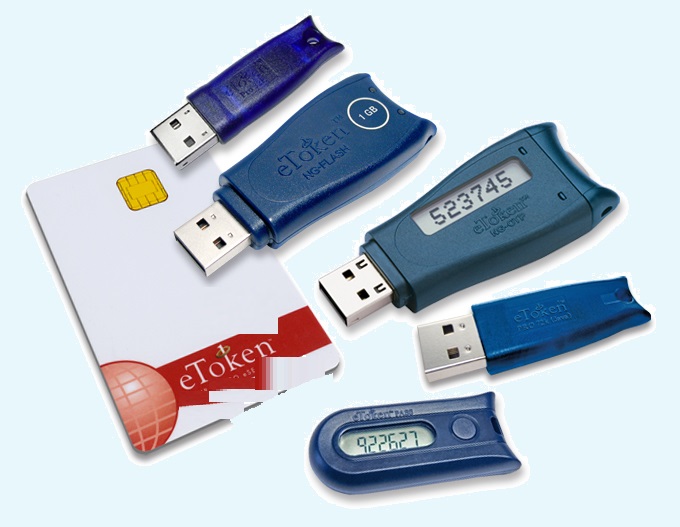
Instituția publică „Centrul de Tehnologii Informaționale în Finanțe” (CTIF), în calitate de centru de înregistrări al Centrului unic de certificare al Guvernului, anunță că a extins termenul de valabilitate a semnăturilor electronice pe care le eliberează până la doi ani. Până în prezent, CTIF elibera semnături electronice doar cu termenul de valabilitate de un an. Directorul instituției, Vitalie Coceban, a relatat că oportunitatea de a obține semnătura electronică pe un termen de doi ani este mai avantajoasă pentru solicitanți din punct de vedere al costurilor, dar și al necesității de reînnoire a acesteia. Din data de 8 aprilie, persoanele interesate pot solicita, în funcție de necesitate, eliberarea semnăturii electronice pe un termen de un an sau de doi ani, a precizat Coceban. Directorul a menționat că, în noile condiții, deținătorii semnăturilor electronice cu termene de valabilitate de doi ani urmează să le prelungească odată la doi ani, fapt ce le va permite să economisească timp și resurse. Semnătura electronică eliberată de CTIF pentru semnarea documentelor electronice este echivalentă cu semnătura olografă pentru documentele pe suport de hârtie, permite accesul prin intermediul serviciilor guvernamentale MPass și MSign la toate serviciile electronice disponibile și autentificarea documentelor electronice, asigurând destinatarul de identitatea expeditorului și de integritatea documentului. CTIF eliberează solicitanților, la cerere, pachetul „semnătura electronică” ce conține certificatul cheii publice și dispozitivul de creare a semnăturii electronice (stick eToken), cu acordarea serviciilor de consultanță și suport tehnic pentru clienți pe toată perioada utilizării semnăturii electronice. Doritorii de a obține de la CTIF semnături electronice valabile pe doi ani pot completa cererea respectivă în mod electronic, accesând Cerere on-line sau programându-se la telefonul 022 822222. Mai multe informații despre procedura de obținere și reînnoire a semnăturilor electronice le puteți afla la Centrul de înregistrări al CTIF la numărul de telefon 022 822 040.

via | ctif.gov.md

Institutions:

Publicaţia periodică "Monitorul Fiscal FISC.MD" | Instituția Publică Centrul de Tehnologii Informaționale în Finanțe (CTIF)

„Acest articol aparține exclusiv P.P. „Monitorul fiscal FISC.md” și este protejat de Legea privind drepturile de autor.
Orice preluare a conținutului se face doar cu indicarea SURSEI și cu LINK ACTIV către pagina articolului”.

3
dna1s7k9v2.png

3367 views

The date of publishing:

08 April /2020 10:59

Catalogul tematic

Noutăți

Tags:

CTIF | Semnătura electronică | termen de valabilitate | monitorul.fisc.md

0 comments

Only users registered

New account

First name *
The field will be filled with letters (A to Z), who will be reflected at articles and comments
Last name *
The field will be filled with letters (A to Z), who will be reflected at articles and comments
Login *
The field will be filled with letters (A to Z) and/or numbers, without free spaces. Can be used the symbols, except the symbol _
E-mail *
The field will be completed with un valid e-mail. To this e-mail will be sent the confirmation link about the registred user account
Password *
The password will be contain at 5 to 15 characters and will be different for the date indicated at the login, name and firstname

Repeat password *

Cancel
and autorized

Sign in

Sign in can be to do with e-mail adresss or login

E-mail/Login *

Password *

Sig in with your Google account
MPass authentication
Cancel

Get the link to change the password

E-mail *

Send
Give up
they have the right to post comments.